some sometimes.
– 05:23:22 🕔
some sometimes.
– 05:23:22 🕔

在学校的一个中午,老师在选值周生,老师选完十五个之后,因为不知道选谁,想一会儿后,决定选张书豪时,我冯传可,上完厕所走进教室的那一刻,老师刚刚念了张字后,就马上朝我转头来:“冯传可,”我一愣,马上搞清楚壮况,就鞠了一躬,说:“谢谢大家,选我,我一定好好干。”

最近有不少人问我如何用openssl命令行来进行签名,验证签名,以及其它一些openssl的命令。
其实我对openssl也不太了解,倒是对rsa了解得比较多一些,像rsa背后的欧拉公式以及证明啊什么的,呵呵呵。
写一个小脚本,里面包含了加密/解密,签名/验证签名等一些例子,仅供参考。
#!/bin/bash

set -e
set -x

# Generate 1024 bits rsa private key and output to file "test.key".
# This private key was encrypted by AES256 with the password "hkp".
openssl genrsa -aes256 -passout pass:hkp   -out test.key 1024
# Generate public key from the private key file "test.key" and output it to public key file "test.pub"
# Since the private key has been encrypted, so we need to pass in the password to decrypt it.
openssl rsa -passin pass:hkp -in test.key -pubout -out test.pub
# Encrypt the plain message from "plain.txt" and output to cipher file "cipher.txt" with public key.
# NB., if encrypt with public key, the option "-pubin" should be provided,
# if encrypt with private key, the password should be provided if needed.
#
# As per the manual of openssl,
# -encrypt encrypt with public key
# -decrypt decrypt with private key
# So even we use private key file "test.key" to encrypt the message, openssl only use the public part of "test.key"
openssl rsautl -encrypt -pubin -inkey test.pub -in plain.txt -out cipher.txt
openssl rsautl -encrypt -passin pass:hkp -inkey test.key -in plain.txt -out cipher_by_private_key_file.txt

# Decrypt the cipher message from "cipher.txt" and output the decrypted message into "decrypt.txt" with private key.
# Since the private key has been encrypted, so we need to pass in the password to decrypt it.
openssl rsautl -decrypt -inkey test.key -passin pass:hkp -in cipher.txt -out decrypt.txt
openssl rsautl -decrypt -inkey test.key -passin pass:hkp -in cipher_by_private_key_file.txt -out decrypt_also_by_private_key_file.txt

# Sign the digest of message with sha256 as the digest algorithm and output the signature to "plain.sig"
openssl dgst -sign test.key -passin pass:hkp -sha256 -out plain.sig plain.txt

# Verify the signature with the public key from public key file "test.pub",
# Please be note that, the signature is of the digest of the message from file "plain.txt".
openssl dgst -verify test.pub -sha256 -signature plain.sig plain.txt
# Since the public key can be retrieved from private key file,
# so openssl also support verify signature via private key file.
openssl dgst -prverify test.key -passin pass:hkp  -sha256 -signature plain.sig plain.txt
Recently I configure my mac with vim-go and gotags which could jump to a tag definition with the CTRL-] and jump back with CTRL-t .
But when I jump back , I end up with an error “godef stack empty” , fortunately you could fix this by add the follow line to your ~/.vimrc
let g:go_def_mapping_enabled=0
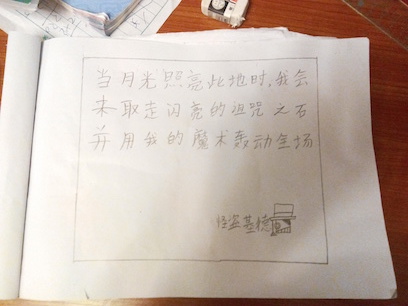
在一个幽静的夜晚,罗格钻石公司上出现了一个白色的身影,那个身影手上的便是日本最大的红宝石,诅咒之石。那个白色的身影后有十几个武警追捕着他,那个白色的身影停了下来,大声说道:“我就是可以把不可能变为可能的怪盗基德,我非常谢谢你们的钻石,”突然间眼前一阵白烟,怪盗基德冲出了玻璃从三十九楼的跳了下去,展开了自己那犹如羽翼般的滑翔翼,在天空给我们画上了一个梦幻般的夜晚。
— 冯传可
But,
The simultaneous interpreter for that speech sucks.
wtf…
AWS is awesome I believe, however I doubt it was a good choice in Mainland China, the GFW you know 🙁